List cell
콘텐츠를 하나의 리스트 단위로 표현하는 요소로, 이미지, 텍스트, 인터랙션 요소 등을 유연하게 조합하여 구성할 수 있습니다. 일관되고 정돈된 형태로 정보를 탐색할 수 있도록 돕습니다.
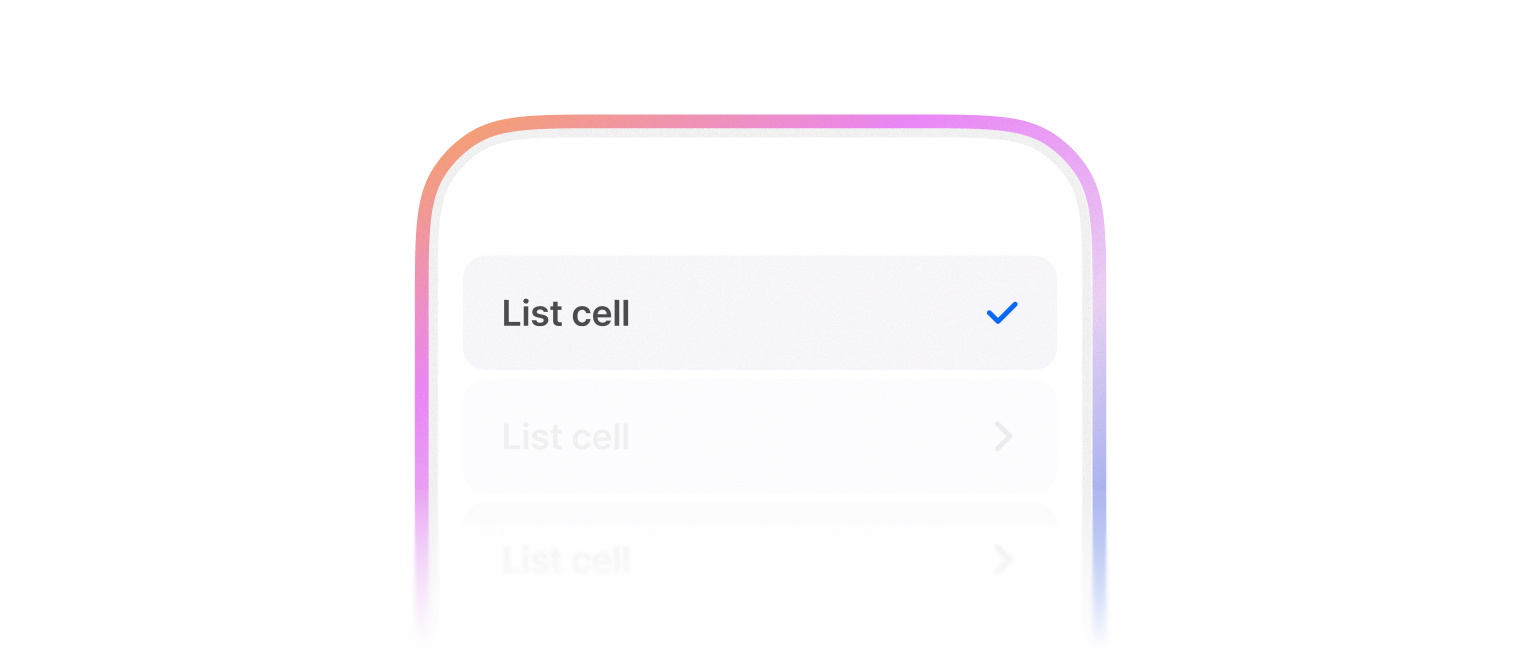
인터랙션이 가능한 리스트 셀입니다.
import { List, ListCell } from '@montage-ui/core';

const Demo = () => {
  return (
    <List sx={{ width: '80%' }}>
      <ListCell>
        Label
      </ListCell>
      <ListCell textProps={{ description: 'Description' }}>
        Label
      </ListCell>
    </List>
  )
}

export default Demo;보통 List 컴포넌트와 함께 사용합니다.
2가지 variant를 사용할 수 있습니다.
- inset (default)
- full
좌/우측 padding이 없으며, 인터렉션 레이어만 바깥으로 넘어가서 노출됩니다.
import { List, ListCell } from '@montage-ui/core';

const Demo = () => {
return (
  <List sx={{ width: '80%' }}>
    <ListCell variant="inset">
      Inset variant cell
    </ListCell>

    <ListCell variant="inset" sx={theme => ({ border: `1px solid ${theme.semantic.line.neutral.primary}` })}>
      Inset variant cell
    </ListCell>
  </List>
)
}

export default Demo;좌/우측 padding이 생기며, 인터렉션 레이어와 너비가 일치하도록 합니다. 또한 Border radius를 제거합니다.
import { List, ListCell } from '@montage-ui/core';

const Demo = () => {
return (
  <List sx={{ width: '80%' }}>
    <ListCell variant="full">
      Full variant cell
    </ListCell>

    <ListCell variant="full" sx={theme => ({ border: `1px solid ${theme.semantic.line.neutral.primary}` })}>
      Full variant cell
    </ListCell>
  </List>
)
}

export default Demo;여러 상태를 표시할 수 있습니다.
- default
- selected
- disabled
selected 상태일 때는 우측에 체크 아이콘이 기본으로 표시됩니다.
trailingContent를 직접 지정하면 교체되며, null을 전달하면 제거할 수 있습니다.
import { List, ListCell } from '@montage-ui/core';

const Demo = () => {
  return (
    <List sx={{ width: '80%' }}>
      <ListCell>
        Default list cell
      </ListCell>
      <ListCell selected>
        Selected list cell
      </ListCell>
      <ListCell disabled>
        Disabled list cell
      </ListCell>
    </List>
  )
}

export default Demo;divider 속성을 사용하여 셀 사이에 구분선을 추가할 수 있습니다.
인터렉션 효과가 발생할 때는 자동 숨김처리 됩니다.
import { List, ListCell } from '@montage-ui/core';

const Demo = () => {
  return (
    <List sx={{ width: '80%' }}>
      <ListCell divider>
        Divider list cell
      </ListCell>
      <ListCell divider>
        Divider list cell
      </ListCell>
    </List>
  )
}

export default Demo;verticalPadding 속성을 사용하여 수직 간격을 조정할 수 있습니다.
- none
- small
- medium (default)
- large
verticalPadding="none" 일 때에는 인터렉션 영역이 비활성화됩니다.
import { List, ListCell } from '@montage-ui/core';

const Demo = () => {
  return (
    <List sx={{ width: '80%' }}>
      <ListCell verticalPadding="none">
        VerticalPadding, None
      </ListCell>
      <ListCell>
        VerticalPadding, Medium (default)
      </ListCell>
      <ListCell verticalPadding="small">
        VerticalPadding, Small
      </ListCell>
      <ListCell verticalPadding="large">
        VerticalPadding, Large
      </ListCell>
    </List>
  )
}

export default Demo;leadingContent, trailingContent를 사용해서 콘텐츠를 추가할 수 있습니다.
콘텐츠를 추가할 때는 ListCellContent로 래핑해서 사용합니다.
Cell을 클릭했을 때 자동으로 leadingContent, trailingContent 내부의 컨트롤 요소를 클릭 처리합니다.
콘텐츠 영역이 클릭되지 않게 하려면 e.stopPropagation 을 사용해서 방지할 수 있습니다.
단,
Switch컴포넌트는 클릭 처리하지 않습니다.
아래 variant들을 사용합니다.
- icon
- large-icon
- checkbox
- radio
- avatar
- thumbnail
- custom
import { Checkbox, Thumbnail, Avatar, List, ListCell, ListCellContent, Radio } from '@montage-ui/core';
import { IconBlank } from '@montage-ui/icon';

const Demo = () => {
  return (
    <List gap="16px" sx={{ width: '80%' }}>
      <ListCell
        textProps={{ description: 'Description' }}
        leadingContent={
          <ListCellContent variant="icon">
            <IconBlank />
          </ListCellContent>
        }
      >
        Label, with icon
      </ListCell>
      <ListCell
        textProps={{ description: 'Description' }}
        leadingContent={
          <ListCellContent variant="large-icon">
            <IconBlank />
          </ListCellContent>
        }
      >
        Label, with large icon
      </ListCell>
      <ListCell
        textProps={{ description: 'Description' }}
        leadingContent={
          <ListCellContent variant="checkbox">
            <Checkbox tabIndex={-1} />
          </ListCellContent>
        }
      >
        Label, with checkbox
      </ListCell>
      <ListCell
        textProps={{ description: 'Description' }}
        leadingContent={
          <ListCellContent variant="radio">
            <Radio tabIndex={-1} checked />
          </ListCellContent>
        }
      >
        Label, with radio
      </ListCell>
      <ListCell
        textProps={{ description: 'Description' }}
        leadingContent={
          <ListCellContent variant="avatar">
            <Avatar variant="person" />
          </ListCellContent>
        }
      >
        Label, with avatar
      </ListCell>
      <ListCell
        textProps={{ description: 'Description' }}
        leadingContent={
          <ListCellContent variant="thumbnail">
            <Thumbnail border radius ratio="1:1" width="56px" />
          </ListCellContent>
        }
      >
        Label, with thumbnail
      </ListCell>


      <ListCell
        textProps={{ description: 'Description' }}
        leadingContent={
          <>
            <ListCellContent variant="checkbox">
              <Checkbox tabIndex={-1} />
            </ListCellContent>
            <ListCellContent variant="thumbnail">
              <Thumbnail border radius ratio="1:1" width="56px" />
            </ListCellContent>
          </>
        }
      >
        Label, with multiple content
      </ListCell>
    </List>
  )
}

export default Demo;아래 variant들을 사용합니다.
- value
- icon-button
- icon
- text-button
- content-badge
- toggle-icon
- button
- checkbox
- switch
- custom
chevron 을 활성화 하여 우측에 화살표 아이콘을 추가할 수 있습니다.
import { List, ListCell, ListCellContent, CheckMark, TextButton, Button, ContentBadge, ToggleIcon, IconButton, Switch } from '@montage-ui/core';
import { IconBlank } from '@montage-ui/icon';

const Demo = () => {
  return (
    <List gap="16px" sx={{ width: '80%' }}>
      <ListCell
        textProps={{ description: 'Description' }}
        trailingContent={
          <ListCellContent variant="value">
            Value
          </ListCellContent>
        }
      >
        Label, with value
      </ListCell>
      <ListCell
        textProps={{ description: 'Description' }}
        trailingContent={
          <ListCellContent variant="icon-button">
            <IconButton tabIndex={-1}>
              <IconBlank />
            </IconButton>
          </ListCellContent>
        }
      >
        Label, with icon button
      </ListCell>
      <ListCell
        textProps={{ description: 'Description' }}
        trailingContent={
          <ListCellContent variant="icon">
            <IconBlank />
          </ListCellContent>
        }
      >
        Label, with icon
      </ListCell>
      <ListCell
        textProps={{ description: 'Description' }}
        trailingContent={
          <ListCellContent variant="checkbox">
            <CheckMark tabIndex={-1} />
          </ListCellContent>
        }
      >
        Label, with checkbox
      </ListCell>
      <ListCell
        textProps={{ description: 'Description' }}
        trailingContent={
          <ListCellContent variant="text-button">
            <TextButton color="assistive" tabIndex={-1}>
              Button
            </TextButton>
          </ListCellContent>
        }
      >
        Label, with text button
      </ListCell>
      <ListCell
        textProps={{ description: 'Description' }}
        trailingContent={
          <ListCellContent variant="content-badge">
            <ContentBadge color="neutral">Badge</ContentBadge>
          </ListCellContent>
        }
      >
        Label, with content badge
      </ListCell>
      <ListCell
        textProps={{ description: 'Description' }}
        trailingContent={
          <ListCellContent variant="toggle-icon">
            <ToggleIcon size={20}>
              <IconBlank />
            </ToggleIcon>
          </ListCellContent>
        }
      >
        Label, with toggle icon
      </ListCell>
      <ListCell
        textProps={{ description: 'Description' }}
        trailingContent={
          <ListCellContent variant="button">
            <Button variant="solid" color="assistive" tabIndex={-1}>
              Button
            </Button>
          </ListCellContent>
        }
      >
        Label, with button
      </ListCell>
      <ListCell
        textProps={{ description: 'Description' }}
        trailingContent={
          <ListCellContent variant="value" chevron>
            Value
          </ListCellContent>
        }
      >
        Label, with chevron
      </ListCell>
      <ListCell
        textProps={{ description: 'Description' }}
        trailingContent={
          <ListCellContent variant="switch">
            <Switch />
          </ListCellContent>
        }
      >
        Label, with switch
      </ListCell>
      <ListCell
        textProps={{ description: 'Description' }}
        trailingContent={
          <>
            <ListCellContent variant="content-badge">
              <ContentBadge color="neutral">Badge</ContentBadge>
            </ListCellContent>
            <ListCellContent variant="value" chevron>
              Value
            </ListCellContent>
          </>
        }
      >
        Label, with multiple content
      </ListCell>
    </List>
  )
}

export default Demo;labelTrailing을 사용해서 레이블 우측에 콘텐츠를 추가할 수 있습니다.
콘텐츠를 추가할 때는 ListCellLabelTrailing으로 래핑해서 사용합니다.
아래 variant들을 사용합니다.
- verified-check
- content-badge
- custom
import { List, ListCell, ListCellLabelTrailing, ContentBadge } from '@montage-ui/core';

const Demo = () => {
  return (
    <List gap="16px" sx={{ width: '80%' }}>
      <ListCell
        textProps={{ description: 'Description' }}
        labelTrailing={
          <ListCellLabelTrailing variant="verified-check" />
        }
      >
        Label, with verified check
      </ListCell>
      <ListCell
        textProps={{ description: 'Description' }}
        labelTrailing={
          <ListCellLabelTrailing variant="content-badge">
            <ContentBadge color="neutral">Badge</ContentBadge>
          </ListCellLabelTrailing>
        }
      >
        Label, with content badge
      </ListCell>
    </List>
  )
}

export default Demo;extraContent를 사용해서 텍스트 영역 하단에 추가 콘텐츠를 추가할 수 있습니다.
콘텐츠를 추가할 때는 ListCellExtraContent로 래핑해서 사용합니다.
아래 variant들을 사용합니다.
- text
- content-badge
- custom
import { List, ListCell, ListCellExtraContent, ContentBadge } from '@montage-ui/core';

const Demo = () => {
  return (
    <List gap="16px" sx={{ width: '80%' }}>
      <ListCell
        textProps={{ description: 'Description' }}
        extraContent={
          <ListCellExtraContent variant="text">
            Extra text
          </ListCellExtraContent>
        }
      >
        Label, with extra text
      </ListCell>
      <ListCell
        textProps={{ description: 'Description' }}
        extraContent={
          <ListCellExtraContent variant="content-badge">
            <ContentBadge color="neutral">Badge</ContentBadge>
          </ListCellExtraContent>
        }
      >
        Label, with extra content badge
      </ListCell>
      <ListCell
        textProps={{ description: 'Description' }}
        extraContent={
          <>
            <ListCellExtraContent variant="content-badge">
              <ContentBadge color="neutral">Badge</ContentBadge>
            </ListCellExtraContent>
            <ListCellExtraContent variant="text">
              Extra text
            </ListCellExtraContent>
          </>
        }
      >
        Label, with multiple extra content
      </ListCell>
    </List>
  )
}

export default Demo;기본 수직 정렬은 flex-start입니다. alignItems로 수직 정렬을 조정할 수 있습니다.
import { List, ListCell, ListCellContent, ContentBadge, ListCellExtraContent, Checkbox, Thumbnail } from '@montage-ui/core';

const Demo = () => {
  return (
    <List sx={{ width: '80%' }}>
      <ListCell
        textProps={{ description: 'Description' }}
        leadingContent={
          <>
            <ListCellContent variant="checkbox">
              <Checkbox tabIndex={-1} />
            </ListCellContent>
            <ListCellContent variant="thumbnail">
              <Thumbnail border radius ratio="1:1" width="56px" />
            </ListCellContent>
          </>
        }
        trailingContent={
          <>
            <ListCellContent variant="content-badge">
              <ContentBadge color="neutral">Badge</ContentBadge>
            </ListCellContent>
            <ListCellContent variant="value" chevron>
              Value
            </ListCellContent>
          </>
        }
        extraContent={
          <>
            <ListCellExtraContent variant="content-badge">
              <ContentBadge color="neutral">Badge</ContentBadge>
            </ListCellExtraContent>
            <ListCellExtraContent variant="text">
              Extra text
            </ListCellExtraContent>
          </>
        }
      >
        Label, Align flex start
      </ListCell>

      <ListCell
        alignItems="center"
        textProps={{ description: 'Description' }}
        leadingContent={
          <>
            <ListCellContent variant="checkbox">
              <Checkbox tabIndex={-1} />
            </ListCellContent>
            <ListCellContent variant="thumbnail">
              <Thumbnail border radius ratio="1:1" width="56px" />
            </ListCellContent>
          </>
        }
        trailingContent={
          <>
            <ListCellContent variant="content-badge">
              <ContentBadge color="neutral">Badge</ContentBadge>
            </ListCellContent>
            <ListCellContent variant="value" chevron>
              Value
            </ListCellContent>
          </>
        }
        extraContent={
          <>
            <ListCellExtraContent variant="content-badge">
              <ContentBadge color="neutral">Badge</ContentBadge>
            </ListCellExtraContent>
            <ListCellExtraContent variant="text">
              Extra text
            </ListCellExtraContent>
          </>
        }
      >
        Label, Align center
      </ListCell>
    </List>
  )
}

export default Demo;ellipsis 속성을 사용하여 Content가 넘치는 경우 말줄임표로 표시할 수 있습니다.
import { List, ListCell, ListCellContent } from '@montage-ui/core';
import { IconBlank } from '@montage-ui/icon';

const TITLE = '동해물과 백두산이 마르고 닳도록 하느님이 보우하사 우리나라 만세 무궁화 삼천리 화려 강산 대한사람 대한으로 길이 보전하세.';
const DESCRIPTION = '남산위에 저 소나무 철갑을 두른 듯 바람서리 불변함은 우리 기상일세 무궁화 삼천리 화려 강산 대한사람 대한으로 길이 보전하세.';

const Demo = () => {
  return (
    <List gap="16px" sx={{ width: '25ch' }}>
      <ListCell
        textProps={{ description: DESCRIPTION }}
        leadingContent={
          <ListCellContent variant="large-icon">
            <IconBlank />
          </ListCellContent>
        }
        trailingContent={
          <ListCellContent variant="value" chevron>
            값
          </ListCellContent>
        }
      >
        {TITLE}
      </ListCell>
      <ListCell
        ellipsis
        textProps={{ description: DESCRIPTION }}
        leadingContent={
          <ListCellContent variant="large-icon">
            <IconBlank />
          </ListCellContent>
        }
        trailingContent={
          <ListCellContent variant="value" chevron>
            값
          </ListCellContent>
        }
      >
        {TITLE}
      </ListCell>
    </List>
  )
}

export default Demo;